


If you’re trying to boost your website’s performance and improve your search engine rankings, Google’s Core Web Vitals are a big deal. They directly impact how users experience your website, and Google uses these metrics to rank sites. But don’t worry – improving Core Web Vitals isn’t as complicated as it sounds. With the help of Google Search Console, you can easily track and improve your Core Web Vitals to ensure your site performs at its best.
In this article, we’ll walk you through what Core Web Vitals are, why they matter, and how you can use Google Search Console to improve them step by step.
What Are Core Web Vitals?
Let’s start with the basics. Core Web Vitals are a set of three metrics that measure how users experience your site. These metrics focus on speed, responsiveness, and visual stability. Here’s a quick overview:
- Largest Contentful Paint (LCP): This measures how long it takes for the largest visible content (like an image or a block of text) to load on your page. Google wants this to happen in under 2.5 seconds for a good user experience.
- First Input Delay (FID): This measures how quickly your site responds when a user first interacts with it (like clicking a button or link). A good FID is under 100 milliseconds.
- Cumulative Layout Shift (CLS): This measures how much your page layout shifts as it loads. For a smooth experience, Google wants the CLS score to be below 0.1.
Why should you care about these metrics? Well, Google has made them a part of their ranking algorithm. So, if your site is slow to load, hard to interact with, or jumps around when it loads, users may leave, and that can hurt your rankings.
How Google Search Console Helps You Improve Core Web Vitals
Google Search Console (GSC) is a free tool that helps you monitor your site’s performance in Google Search. It’s a great resource for improving your Core Web Vitals. Here’s how you can use it:
1. Check Your Core Web Vitals Report
First, log into your Google Search Console account. Once you’re in, find the “Core Web Vitals” report under the “Experience” section. This will show you how well your site is performing based on the three Core Web Vitals metrics (LCP, FID, and CLS).
In the report, Google will categorize your pages into three groups:
- Good: Pages that meet the ideal thresholds.
- Needs Improvement: Pages that are almost there but could be better.
- Poor: Pages that need some serious attention.
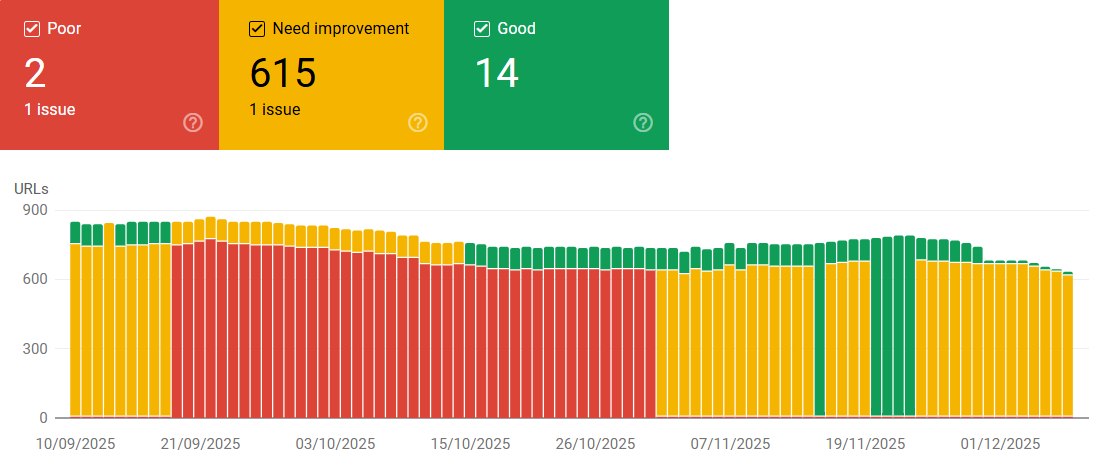
You’ll see how each page is performing, and you’ll also get specific URLs that need improvement.
2. Prioritize Pages to Fix
Once you see which pages have issues, it’s time to prioritize fixing them. Focus first on the pages labeled as “Poor”. These pages are the most critical because they’re hurting both your users’ experience and your search rankings.
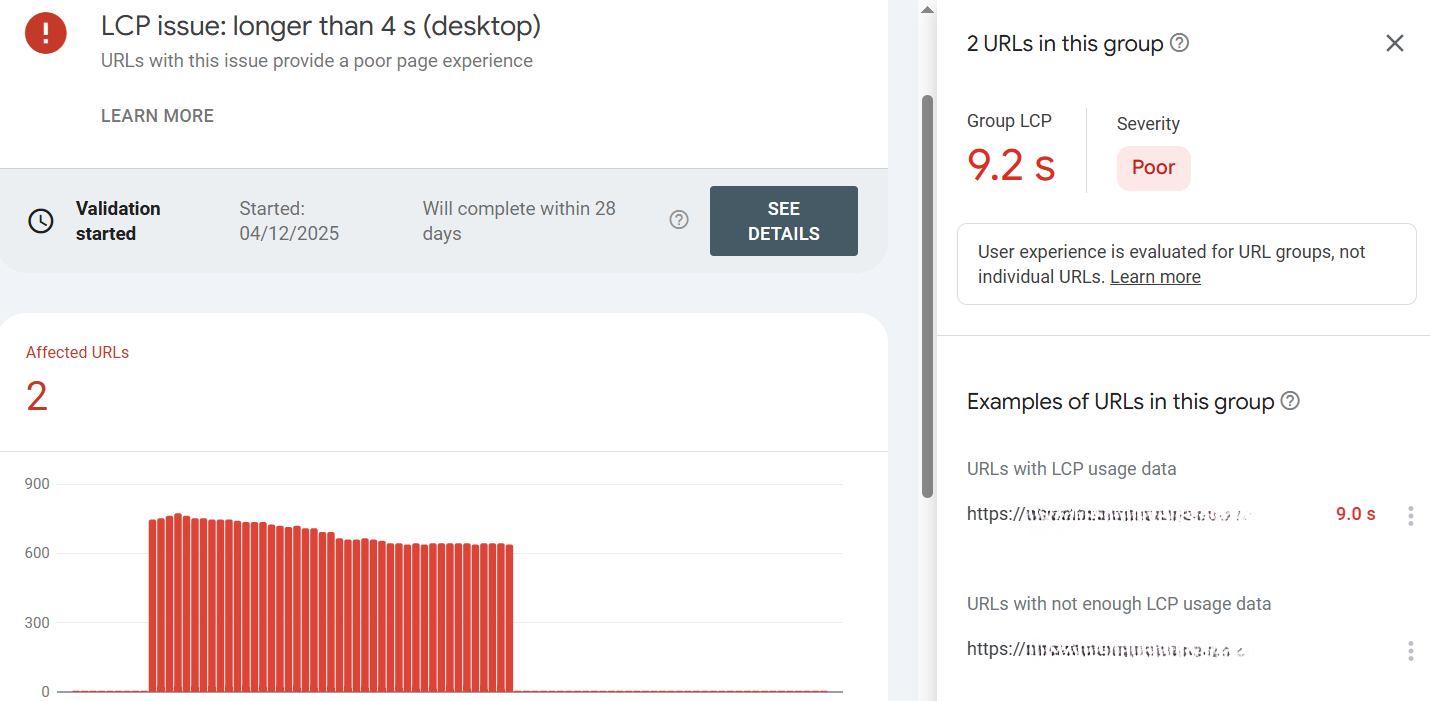
Click on a page with issues, and you’ll get more details. You’ll see whether it’s an LCP problem (slow loading), FID issue (sluggish interactivity), or CLS (layout shifts). Knowing exactly what’s wrong will help you fix it efficiently.
3. Use PageSpeed Insights for Details
To dive deeper, use PageSpeed Insights, which is linked to Google Search Console. Just click the link from the Core Web Vitals report. PageSpeed Insights will break down the issues on the page and give you specific recommendations on what to do. For example, it might tell you to:
- Optimize images
- Minimize JavaScript
- Reduce server response time
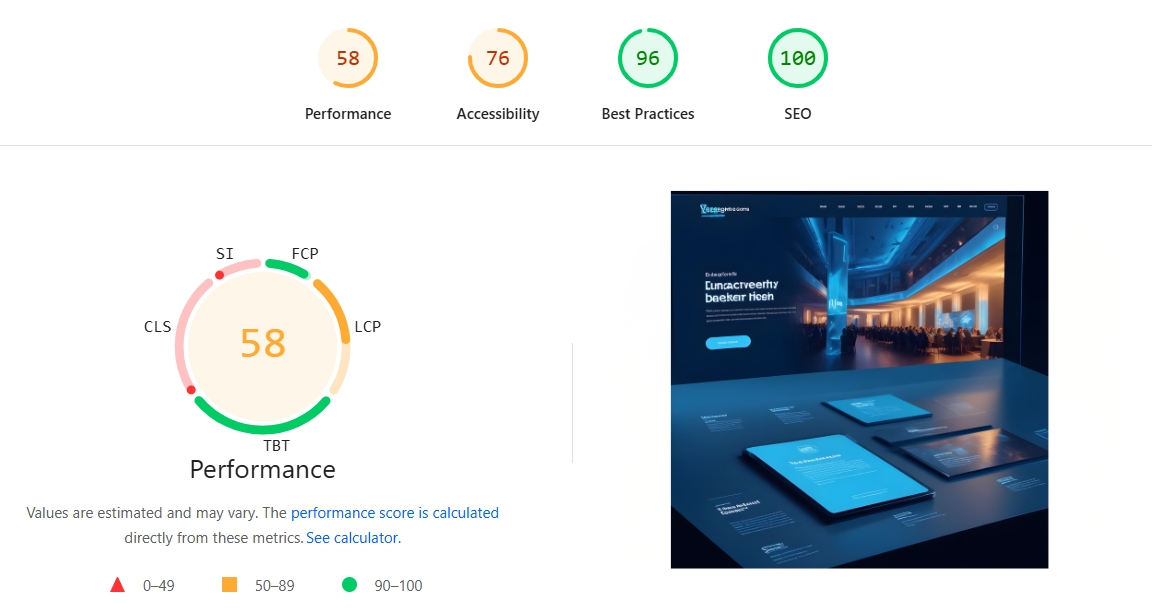
By following these suggestions, you can improve the performance of your pages.
4. Track Your Progress
After you make changes, use Google Search Console to track your progress. The Core Web Vitals report updates regularly, so you’ll be able to see if your changes are improving the performance of your pages. If the metrics are improving, that means you’re on the right track!
If the numbers aren’t improving as expected, you can go back and make more adjustments, or use PageSpeed Insights again for more detailed recommendations.
5. Set Up Alerts for Real-Time Monitoring
Google Search Console allows you to set up alerts. So, if your Core Web Vitals performance suddenly drops, you’ll get an email notification. This way, you can jump into action quickly and prevent any problems from hurting your site’s user experience or SEO.
Easy Tips for Improving Core Web Vitals
Here are some simple fixes you can apply to improve your Core Web Vitals:
- Optimize Images: Large, uncompressed images can slow down your page’s load time (LCP). Compress images or use next-gen formats like WebP to make them load faster.
- Minimize JavaScript: Too much or poorly optimized JavaScript can increase FID (making the site less responsive). Try deferring unnecessary scripts and reduce the number of scripts that run on page load.
- Improve Server Response Time: Slow server response times can hurt both LCP and FID. Consider switching to a faster hosting provider or implement caching to speed up your site.
- Avoid Layout Shifts: To reduce CLS, ensure that elements on your page (like images, buttons, or ads) don’t move around as the page loads. Use fixed sizes for images, and make sure elements have reserved space.
- Use Lazy Loading: Implement lazy loading for images and videos so that they only load when the user scrolls down to them. This can improve LCP by reducing the initial load time.
Final Thoughts
Improving your Core Web Vitals with Google Search Console doesn’t have to be a daunting task. By regularly checking the Core Web Vitals report, following Google’s suggestions, and making a few simple tweaks to your website, you can significantly improve user experience and boost your search rankings.
Just remember to track your progress over time and keep monitoring your site’s performance. With consistent attention to these key metrics, you’ll create a smoother, faster website that both users and Google will love.
So, go ahead and take action today—your users (and your SEO) will thank you for it!